

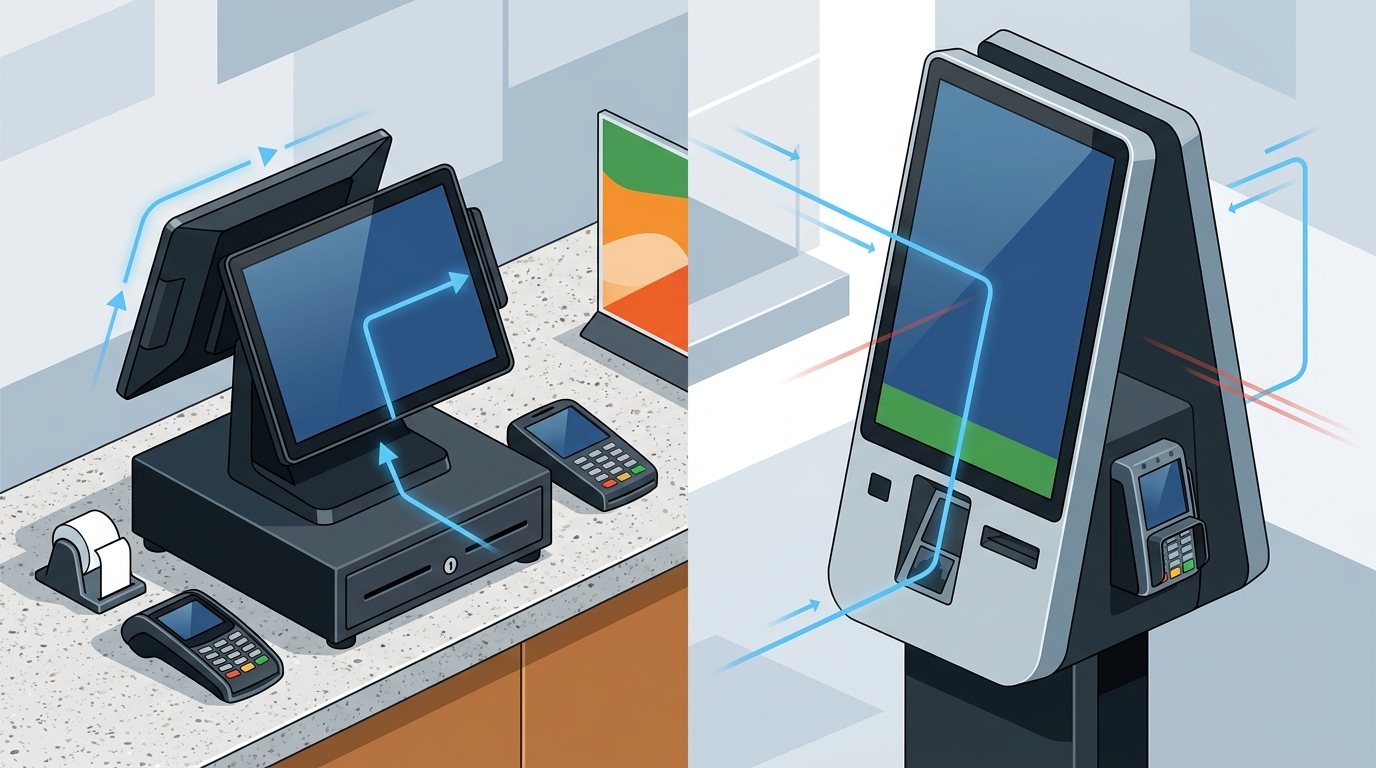
For most quick-service counter operations, a dedicated countertop terminal with a dual-screen configuration fits the workflow better than a standalone kiosk. Kiosks excel in high-volume, self-service environments but often create friction for complex orders or staff-assisted interactions. This guide examines how countertop hardware, dual-screen setups, cash drawer integration, and counter footprint constraints determine the right fit for your specific service style.
Countertop Terminal Hardware
Countertop terminal hardware is a fixed-point device designed for high-throughput order entry and payment processing at a staffed register. Unlike mobile handhelds or self-service kiosks, these terminals remain in a fixed location, allowing for stable network connections and consistent hardware performance. For quick-service operators, the choice of terminal dictates the speed of the line and the reliability of the payment flow.
Performance and Durability
Quick-service environments demand hardware that can withstand constant use. A robust countertop terminal should feature a responsive touchscreen, durable casing, and reliable connectivity. When the line is long, every second of lag in the interface impacts customer satisfaction. Process with Bryant helps operators select hardware that matches the pace of their specific operation, ensuring the device can handle the volume without slowing down service.
Payment Integration
The terminal must integrate seamlessly with payment processing. This includes support for EMV chip cards, contactless NFC payments, and magnetic stripe swipes. A well-configured countertop setup ensures that the payment step is as fast as the order entry step. By focusing on the hardware that supports these payment methods, owners can reduce the friction at the point of sale.
Dual Screen Configuration
Dual screen configuration is a setup where the POS system displays two distinct interfaces simultaneously: one for the staff member and one for the customer. This arrangement is critical for transparency and trust in quick-service environments. The staff screen handles order entry, modifiers, and internal notes, while the customer screen displays the running total, itemized list, and payment prompts.
Transparency and Trust
When customers can see exactly what is being charged, it reduces anxiety and potential disputes. A dual-screen setup allows the customer to verify their order and see the total before the payment is processed. This transparency is a significant advantage over single-screen setups where the customer must rely on the staff member to read the total aloud. It also simplifies the payment process, as the customer can interact with the payment prompt directly on their screen.
Operational Efficiency
For staff, the dual-screen setup provides a clear workspace. The primary screen is dedicated to the POS interface, allowing for quick navigation and order entry. The secondary screen, facing the customer, handles the payment and receipt confirmation. This separation of duties ensures that the staff member can focus on the order while the customer manages the payment, streamlining the overall transaction time.
Cash Drawer Integration
Cash drawer integration is the physical and software connection between the POS terminal and the cash drawer used for handling currency. In quick-service operations, cash remains a significant portion of transactions, making the drawer a critical component of the counter setup. The integration must be reliable, allowing the drawer to open automatically upon a cash sale or manual command.
Reliability and Security
Workflow Considerations
The placement of the cash drawer relative to the terminal and the customer is a key workflow consideration. The drawer should be positioned so that the staff member can access it easily without obstructing the customer's view or the payment process. A well-planned counter layout ensures that the cash drawer, terminal, and payment devices work together as a cohesive unit, minimizing movement and maximizing efficiency.
Counter Footprint Constraints
Counter footprint constraints refer to the physical space limitations of the service counter where the POS hardware is installed. In many quick-service locations, counter space is at a premium, requiring a compact and efficient hardware setup. The choice between a countertop terminal and a kiosk is often driven by the available space and the need to maintain a clear line of sight for both staff and customers.
Space Optimization
A countertop terminal typically has a smaller footprint than a standalone kiosk, making it a better fit for counters with limited space. Kiosks, while effective for self-service, require a dedicated area that can obstruct the flow of customers if not carefully placed. For operations where staff assistance is preferred or required, a compact countertop setup allows for a more open and inviting counter area. This is particularly important in locations where the counter is the primary point of interaction.
Flexibility and Scalability
Counter footprint constraints also influence the flexibility of the hardware setup. A modular countertop system can be adjusted or expanded as the business grows, whereas a kiosk installation is more permanent. Process with Bryant helps owners evaluate their counter space and determine the most effective hardware configuration. By considering the physical constraints of the counter, operators can choose a setup that maximizes efficiency and customer experience.
Key Takeaways
- Countertop terminals are generally better suited for staffed quick-service counters than standalone kiosks.
- Dual-screen configurations enhance transparency and streamline the payment process for both staff and customers.
- Reliable cash drawer integration is essential for secure and efficient cash handling in quick-service operations.
- Counter footprint constraints often favor compact countertop setups over larger kiosk installations.
- Hardware selection should align with the specific service style and operational needs of the business.
- Process with Bryant provides local expertise in selecting and configuring POS hardware for Oregon and Washington operators.
- A well-planned counter setup minimizes friction and maximizes throughput during busy shifts.
- Transparency in pricing and order details builds customer trust and reduces disputes.
Frequently Asked Questions
Is a kiosk better than a countertop terminal for quick-service?
For most staffed quick-service counters, a countertop terminal is better because it allows for staff assistance and complex order handling. Kiosks are best for high-volume, self-service scenarios where customers prefer to order independently.
What is the main advantage of a dual-screen POS setup?
The main advantage is transparency. Customers can see the order and total in real-time, which builds trust and simplifies the payment process.
How does cash drawer integration affect workflow?
Proper integration ensures that cash is handled securely and efficiently. It allows for automatic opening on cash sales and precise tracking for reconciliation.
Can a countertop terminal handle contactless payments?
Yes, modern countertop terminals support EMV, NFC, and magnetic stripe payments, ensuring a fast and secure checkout experience.
What should I consider regarding counter space?
Consider the available space and the need for a clear line of sight. A compact countertop setup is often more flexible and less obstructive than a kiosk.
How can Process with Bryant help with hardware selection?
Process with Bryant provides local, hands-on guidance to help operators choose the right hardware and configuration for their specific operation in Oregon and Washington.