
How Often Should a Restaurant Owner Evaluate Their POS System for Friction?
Restaurant owners should evaluate their POS system for friction at least quarterly, with immediate checks triggered by specific operational failures. This guide covers integration performance, friction detection metrics, evaluation frequency, staff feedback mechanisms, operational signals, and system evaluation triggers. It provides a practical framework for maintaining a reliable point of sale environment. For additional details, review the About Bryant Georgen Process.
Integration Performance
POS integration performance is the measure of how smoothly your point of sale system communicates with payment processors, kitchen display systems, and inventory software. When integrations fail, the friction is immediate and visible to guests. A slow handoff between the counter and the kitchen can delay service by seconds, which compounds during peak hours. Owners must verify that data flows between these systems without latency or errors. For additional details, review the POS Services Process with.
Payment Gateway Latency
Payment processing is the most critical integration. If a card tap takes longer than three seconds to authorize, guests notice the delay. This latency often stems from network issues or outdated hardware rather than the software itself. Regular testing of payment terminals ensures that the connection remains stable and fast. For additional details, review the Quick Service POS Process.
Third-Party App Stability
Many restaurants rely on third-party applications for loyalty programs or online ordering. These apps must sync seamlessly with the core POS. If a loyalty point is not recorded correctly, or if an online order does not appear on the kitchen display, the integration has failed. Monitoring these sync points is essential for maintaining a unified operational view.
Friction Detection Metrics
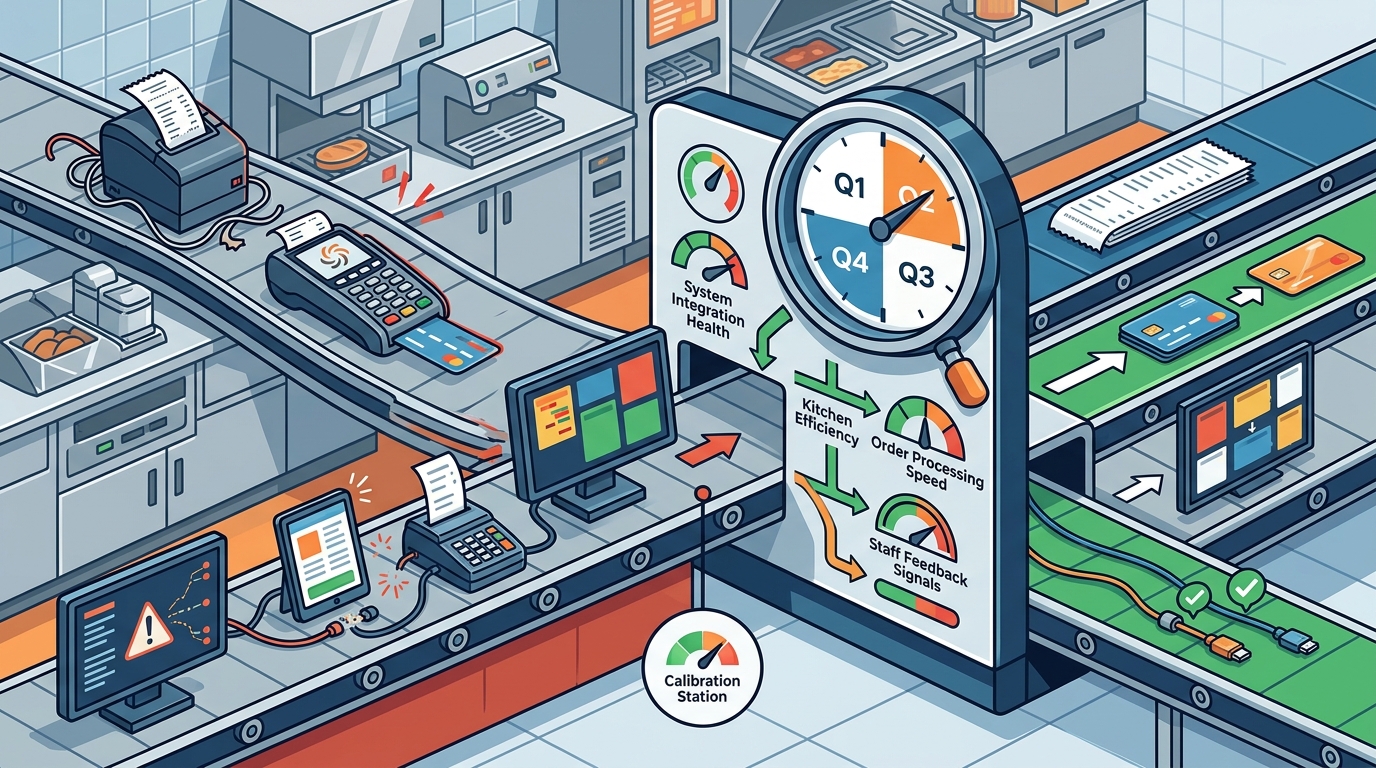
Friction detection metrics are quantitative data points that highlight where the POS system is slowing down operations. Instead of relying on gut feelings, owners should track specific numbers that indicate inefficiency. These metrics provide an objective baseline for evaluating system health over time.
Transaction Processing Time
Track the average time from order entry to payment completion. A sudden increase in this metric often signals hardware degradation or software bloat. Comparing this time against historical averages helps identify when the system is no longer performing at its peak capacity.
Error and Retry Rates
Count the number of failed transactions that require a retry. A high retry rate indicates instability in the payment network or hardware. This metric is a direct indicator of friction that impacts both revenue and customer satisfaction.
POS Evaluation Frequency
POS evaluation frequency refers to the scheduled intervals at which a restaurant owner reviews the system's performance and fit. A structured schedule ensures that small issues do not become major operational failures. The recommended cadence balances thoroughness with the demands of daily restaurant management.
Quarterly Deep Dives
Conduct a comprehensive review every three months. This review should include a full audit of hardware condition, software updates, and integration stability. It is the time to assess whether the system still aligns with the restaurant's current menu and service model.
Monthly Spot Checks
Perform a brief check once a month. Focus on the most critical workflows, such as opening and closing the register and processing a split check. This quick assessment catches emerging issues before they escalate into full outages.
Staff Feedback Mechanisms
Staff feedback mechanisms are structured processes for collecting input from the employees who use the POS system daily. Front-of-house and back-of-house staff encounter friction that managers may not see. Creating a channel for this feedback ensures that the evaluation is grounded in real-world usage.
Shift Handoff Notes
Implement a simple log where staff can note recurring issues during their shift. This could be a physical notebook or a digital form. The goal is to capture specific examples of friction, such as a button that is hard to reach or a report that is difficult to generate.
Regular Team Check-ins
Dedicate five minutes in weekly staff meetings to discuss system usability. Ask specific questions about what is slowing them down. This direct dialogue helps identify friction that is not captured by automated metrics.
Operational Friction Signals
Operational friction signals are observable behaviors that indicate the POS system is hindering service. These signals often appear in the flow of the restaurant rather than in the software interface. Recognizing these signals allows owners to address friction before it impacts the guest experience.
Workarounds and Improvisation
Watch for staff using workarounds, such as writing orders on paper because the screen is lagging. If employees are bypassing the system to complete tasks, the system is creating friction. These workarounds are a clear sign that the technology is not supporting the operation.
Guest Complaints
Listen for guest complaints about slow service or payment issues. While not all complaints are POS-related, a pattern of complaints about payment delays or order errors points to system friction. Addressing these complaints often requires a deeper look at the POS configuration.
System Evaluation Triggers
System evaluation triggers are specific events that require an immediate review of the POS system, outside of the regular schedule. These triggers indicate that the system is no longer meeting the restaurant's needs. Acting quickly on these triggers prevents prolonged periods of operational inefficiency.
Menu or Service Model Changes
Significant changes to the menu or service model, such as adding a new beverage program or switching to a delivery-heavy model, require a system evaluation. The POS must be able to handle the new complexity without slowing down. This is a critical moment to ensure the system can scale with the business.
Hardware Failure or Aging
When hardware begins to fail or show signs of aging, such as slow boot times or unresponsive screens, an evaluation is necessary. Aging hardware is a common source of friction that software updates cannot fix. Replacing or upgrading hardware may be the most effective way to restore performance.
Key Takeaways
- Evaluate your POS system for friction at least quarterly to maintain optimal performance.
- Track quantitative metrics like transaction time and error rates to objectively measure friction.
- Implement structured staff feedback mechanisms to capture real-world usage issues.
- Watch for operational signals like workarounds and guest complaints as indicators of friction.
- Use specific triggers, such as menu changes or hardware aging, to initiate immediate evaluations.
- Ensure integrations with payment and kitchen systems are tested regularly for stability.
- Align the POS system with the current service model to avoid scaling issues.
Frequently Asked Questions
How often should I test my POS payment terminals?
You should test payment terminals daily during opening and closing procedures. A full diagnostic test should be performed monthly to ensure hardware health and network connectivity.
What is the best way to collect staff feedback on the POS?
The best way is to use a simple, low-friction method like a digital form or a dedicated section in shift handoff notes. Keep the questions specific and focused on daily tasks.
Does a slow POS affect customer satisfaction?
Yes, a slow POS directly impacts customer satisfaction by delaying service and payment. Guests are increasingly sensitive to speed and efficiency in their dining experience.
When should I consider replacing my POS system entirely?
Consider replacement when the system no longer supports your business model, when hardware failures become frequent, or when the cost of maintenance exceeds the cost of a new system.
How do I measure the success of a POS evaluation?
Measure success by tracking improvements in key metrics such as transaction time, error rates, and staff satisfaction scores after implementing changes.
Is it necessary to evaluate the POS if we are not having outages?
Yes, outages are only one type of friction. Slow performance, difficult workflows, and integration issues can cause significant friction even without a complete system failure.
Conclusion
Regular evaluation of your POS system is essential for maintaining a smooth and efficient restaurant operation. By monitoring integration performance, tracking friction metrics, and listening to staff feedback, you can identify and address issues before they impact your business. Contact Process with Bryant for a free POS review to ensure your system is working as hard as you are.